PDF/A is a restricted version of the PDF format created for one purpose: long-term preservation. It’s an ISO standard (ISO 19005) that strips out everything in a normal PDF that could stop the file from rendering correctly years from now — and forces in everything required to guarantee it still will. A PDF/A file is meant to look and behave the same in 2050 as it does today, with no missing fonts, no broken links, and no dependency on software that may no longer exist.
The defining trait is self-containment. Where an ordinary PDF can point to fonts on your system, pull in external content, or rely on encryption keys, a PDF/A has to embed its fonts, declare its colors unambiguously, and forbid anything it can’t carry inside itself. That single constraint is what separates an archival document from a merely shareable one.
How PDF/A Actually Differs From a Normal PDF
PDF/A isn’t a different file type — it’s a conformance profile. The same .pdf extension, the same readers, but a stricter rulebook the file has to obey, validated against the ISO 19005 specification. Understanding the rules matters because they explain every frustration people hit when a system rejects their upload.
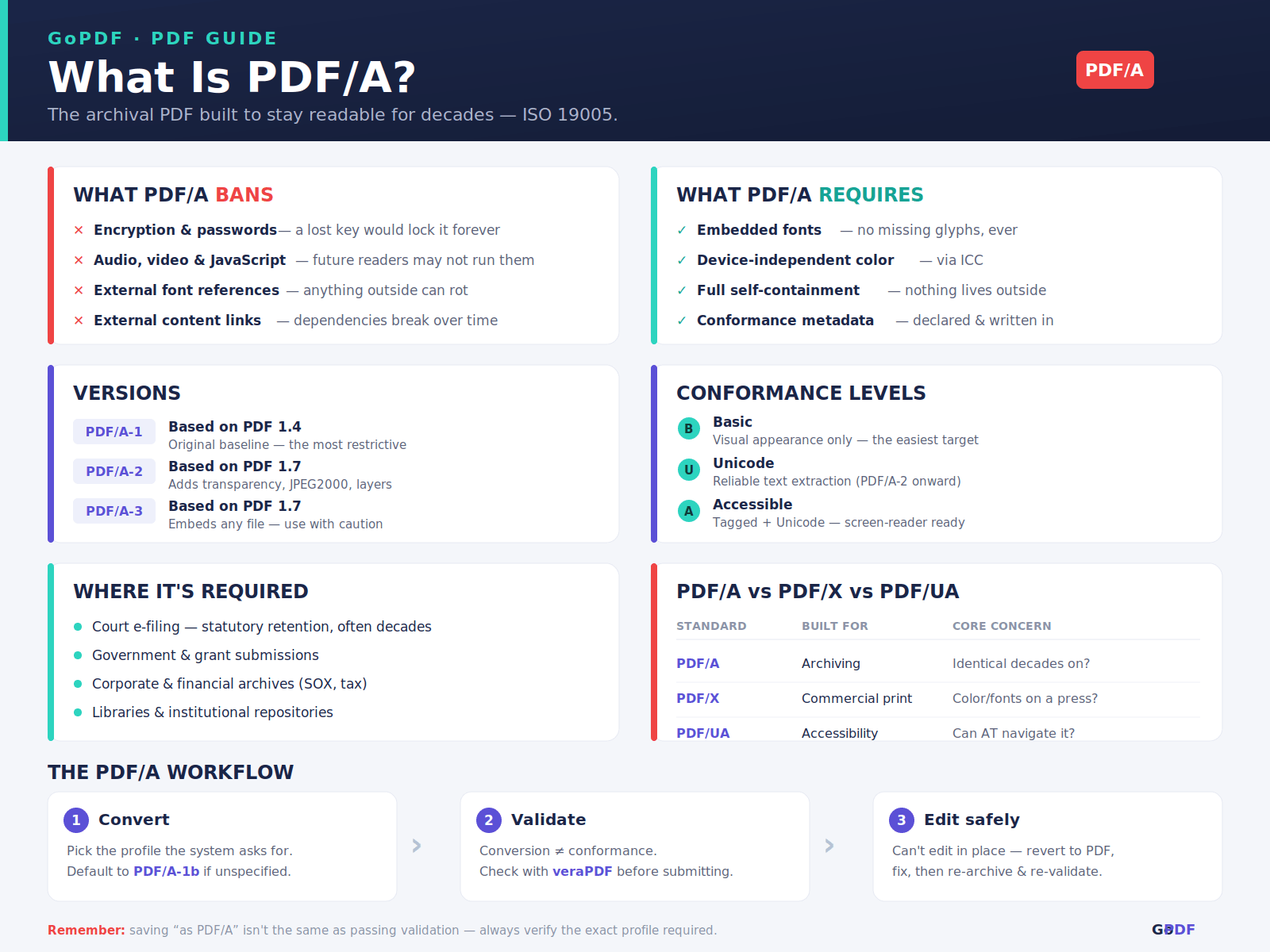
The prohibitions are the interesting part. PDF/A bans encryption, so you cannot password-protect an archival file — the logic being that a key lost in 30 years would lock the document forever. It bans audio, video, and executable JavaScript, because there’s no guarantee future software will run them. It forbids external font references and external content links, since anything outside the file is a dependency that can rot. And it requires device-independent color (via embedded ICC profiles), so a logo’s exact blue survives even if the original monitor and printer are long gone.
This is why “just save as PDF/A” sometimes fails. A document built with a font the software can’t embed, or one that links to a live web resource, won’t conform until those dependencies are resolved. The standard is doing exactly what it promises — refusing to archive anything it can’t fully preserve.
Where PDF/A Is Actually Required
Most people meet PDF/A not by choice but because a system demands it, and the demand almost always traces back to a legal or regulatory retention rule. Recognizing the context tells you why the hoop exists.
- Court e-filing — many judicial systems mandate PDF/A so a filing remains readable for the full statutory retention period, sometimes decades.
- Government and grant submissions — agencies require it for records that must outlive the software used to create them.
- Corporate and financial archives — invoices, contracts, and audit records kept for compliance (think SOX or tax-retention windows) are stored as PDF/A so an auditor in year seven sees the original exactly.
- Libraries and institutional repositories — digitized books and theses, where the whole point is permanence.
A concrete pattern worth knowing: organizations rarely author in PDF/A. They draft normally, then convert to PDF/A at the moment of archiving — the instant a document crosses from “still in use” to “now a record.” That conversion step is where the standard actually enters most workflows.
The Versions and Conformance Levels (Where Most Confusion Lives)
“PDF/A” alone is underspecified, and the suffixes trip up even experienced users. There are versions (the generation of the standard) and conformance levels (how strict the file is), and they combine, which is why you see labels like PDF/A-1b or PDF/A-2u.
| Version | Based on | Adds |
|---|---|---|
| PDF/A-1 | PDF 1.4 | The original archival baseline; most restrictive |
| PDF/A-2 | PDF 1.7 (ISO 32000-1) | JPEG2000, transparency, layers, and embedding other PDF/A files |
| PDF/A-3 | PDF 1.7 | Lets you embed any file (e.g., the source spreadsheet) inside the archive |
Then the conformance level, appended as a letter:
- Level B (basic) — guarantees the visual appearance is preserved. The page will look right; the text may not be reliably extractable.
- Level A (accessible) — adds tagged structure and Unicode mapping, so the document is searchable, copyable, and screen-reader navigable.
- Level U (Unicode) — a middle ground (PDF/A-2 onward): reliable text extraction without full accessibility tagging.
The practical takeaway competitors gloss over: if a portal says “PDF/A-1b,” it wants visual fidelity and nothing more, and that’s the easiest target to hit. If it says “PDF/A-1a,” you’re committing to full tagging — a much heavier lift, usually only mandated where accessibility law applies. PDF/A-3 is the one to use cautiously; because it can embed arbitrary files, some archives ban it outright, since a hidden embedded file undermines the “everything is visible and preserved” promise.
PDF/A vs PDF/X and PDF/UA
PDF/A is one of a family of specialized PDF standards, and they’re easy to conflate because they share the parent format. The difference is purely intent: each profile optimizes for a different downstream use, and a file can even satisfy more than one.
| Standard | Built for | Core concern |
|---|---|---|
| PDF/A | Archiving | Will it open and look identical decades from now? |
| PDF/X | Commercial print | Will the color and fonts reproduce correctly on a press? |
| PDF/UA | Accessibility | Can assistive technology navigate it? |
The overlap worth noting: a PDF/A at conformance level A borrows heavily from the same tagging discipline PDF/UA requires, which is why accessible archival documents often satisfy both. PDF/X, by contrast, permits things PDF/A bans (like specific output-intent assumptions), so a print-ready file is not automatically an archive-ready one.
Applied PDF/A Workflows
In practice, working with PDF/A comes down to three jobs: converting a document into it, checking that the conversion actually conformed, and dealing with the fact that you can’t edit it freely afterward. Each runs in a browser or desktop app — a tool like GoPDF handles the conversion step without installing software.
Converting an existing PDF to PDF/A. Open the file, choose ” convert to PDF/A ” and pick the target profile the receiving system asked for (default to PDF/A-1b if they didn’t specify — it’s the broadest and easiest to satisfy). The converter embeds any missing fonts, flattens disallowed elements, and writes the conformance metadata. If you’re preparing a batch of records for an archive, converting through a tool like GoPDF and standardizing everyone on the same profile prevents the mismatched-version headaches that show up at audit time.
Validating conformance. Conversion and conformance aren’t the same thing — a file can be saved “as PDF/A” and still fail validation if a font couldn’t embed. Before submitting anything that matters, run it through a PDF/A validator (the open-source veraPDF is the reference checker the industry trusts) and confirm it passes for the exact profile required. This is the step most guides skip, and it’s the one that prevents a rejected court filing.
Editing or “un-archiving.” Because PDF/A forbids encryption and locks structure, the honest move when you need to change an archived document is to convert it back to a standard PDF, make the edit, and re-archive — not to hack the existing file. A real example: a finance team needs to correct a figure on an archived invoice. Rather than editing the PDF/A in place, they revert it to a normal PDF, fix the number, then re-convert to PDF/A and re-validate, preserving a clean before/after record. For confidential records, prefer a workflow you control, since browser conversion uploads the file to a server.
Frequently Asked Questions
What is PDF/A?
PDF/A is an ISO-standardized version of PDF (ISO 19005) designed for long-term archiving. It requires the file to be fully self-contained — embedded fonts, no encryption, no external dependencies — so it stays readable indefinitely.
What is the difference between PDF and PDF/A?
A normal PDF can rely on external fonts, encryption, and multimedia. PDF/A bans those and forces everything needed to display the file to be embedded, trading flexibility for guaranteed long-term readability.
What does the number mean in PDF/A-1, PDF/A-2, and PDF/A-3?
The number is the version of the standard. PDF/A-1 is the original baseline, PDF/A-2 adds features like transparency and JPEG2000, and PDF/A-3 allows embedding arbitrary source files inside the archive.
What is the difference between PDF/A-1a and PDF/A-1b?
Both preserve the visual appearance. PDF/A-1b (basic) guarantees only that the page looks correct, while PDF/A-1a (accessible) also requires tagged structure and Unicode text so the document is searchable and screen-reader friendly.
How do I convert a PDF to PDF/A?
Open the PDF in a converter such as GoPDF or a desktop PDF tool, choose “convert to PDF/A,” and select the required profile (PDF/A-1b is the common default). The tool embeds fonts and removes disallowed elements during conversion.
Can I edit a PDF/A file?
Not directly in most cases, since PDF/A locks structure and forbids encryption. The standard approach is to convert it back to a regular PDF, make the change, then re-convert to PDF/A and re-validate.
Why can’t I password-protect a PDF/A?
PDF/A prohibits encryption on purpose. An archive that required a password could become permanently inaccessible if the key were lost, which defeats the goal of guaranteed long-term access.
How do I check if a file is really PDF/A compliant?
Run it through a PDF/A validator such as the open-source veraPDF, which checks the file against the exact version and conformance level you need and reports any failures before you submit it.