PDF stands for Portable Document Format — a file type that records a document as a fixed page rather than as editable text, so the layout, fonts, and images stay identical no matter where the file is opened. Save something as .pdf and you’ve effectively taken a snapshot of the finished page: it won’t re-flow on a smaller screen, won’t swap fonts on a machine that lacks them, and won’t shift when it’s printed.
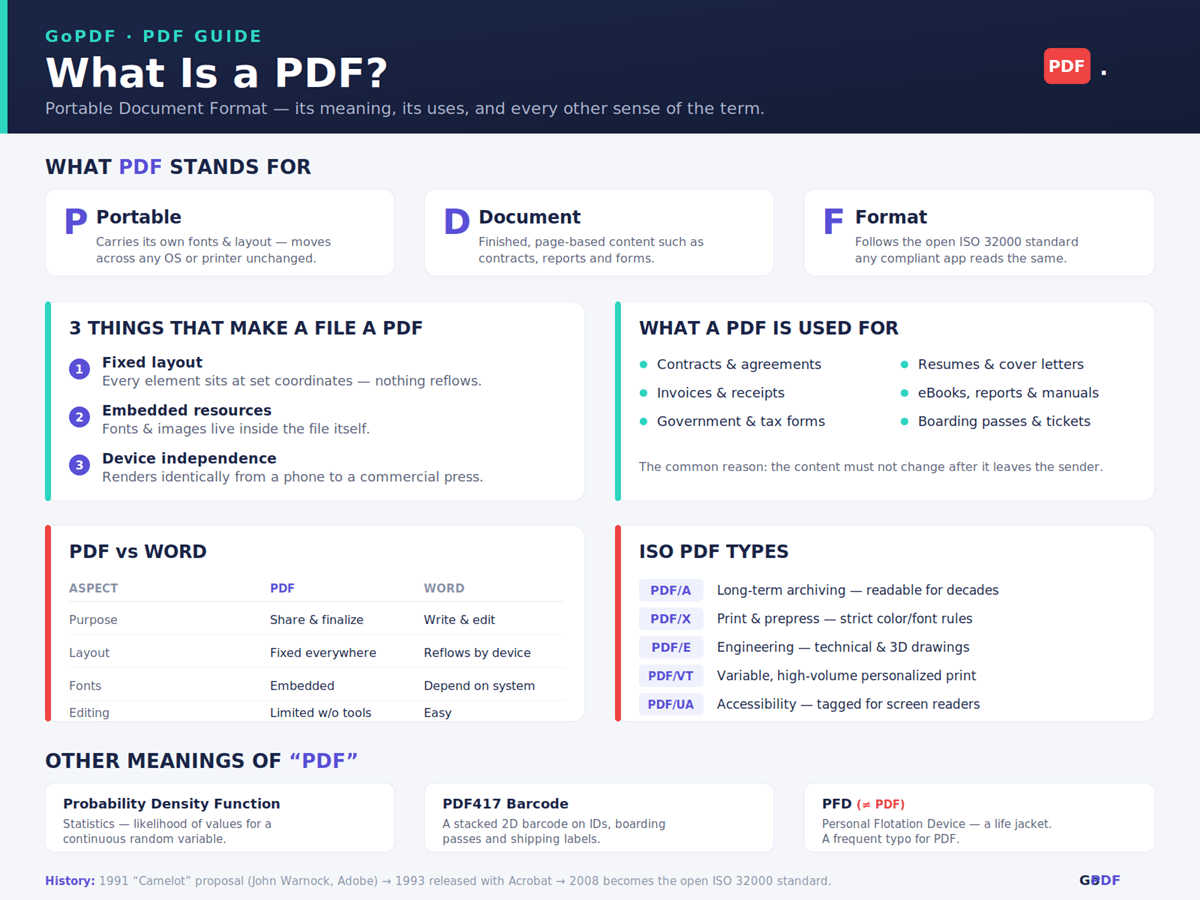
The acronym is unusually literal. Portable means the file carries its own fonts and layout instructions, so it survives the move between Windows, macOS, Android, iOS, and print. Document means it’s built for finished, page-based material. Format means it follows a published specification — today the open ISO 32000 standard. There is no longer expansion hiding behind the letters; Portable Document Format is the whole of it. Worth flagging early, because it surprises people: “PDF” also means other things in other fields, which the later sections sort out.
How a PDF Actually Works
The cleanest way to think about a PDF is as a set of drawing instructions, not a bag of text. Each page is described as an exact arrangement of glyphs, vector paths, and raster images at fixed coordinates, using a page-description model that descends directly from Adobe PostScript. The file tells the reader where to put every mark; the reader doesn’t get a vote. That single property is why two people on completely different hardware see the same page down to the line break.
It also explains a thing that confuses people constantly: why some PDFs are easy to edit and others feel locked. A PDF exported straight from software contains real, addressable text objects, so a word can be changed in place. A PDF produced by scanning paper contains no text at all — only an image of text — until Optical Character Recognition analyzes the picture and writes an invisible, selectable text layer beneath it(OCR pdf). Same file extension, very different internals. Beyond the visible page, a PDF can also hold metadata, bookmarks, internal hyperlinks, form fields, and digital signatures that cryptographically confirm who approved the file and whether it has changed since.
How the PDF Came to Exist
The format came out of Adobe. In 1991, co-founder John Warnock circulated an internal proposal nicknamed the Camelot project, describing a way to capture any document and reproduce it faithfully on any device. Adobe released the result in 1993 with the first Acrobat software, built on its PostScript technology so a page could be described precisely enough to both display and print identically.
The detail most explainers skip is what changed in 2008: Adobe gave up sole control and handed the specification to the International Organization for Standardization, where it became ISO 32000. That’s not trivia — it’s why the format won. Once any vendor could implement PDF without licensing it from Adobe, it stopped being a product feature and became infrastructure, which is precisely what let it outlast competing document formats that stayed proprietary.
What People Actually Use PDFs For
Every common use of the PDF comes back to one motive: the content must not change after it leaves your hands. That framing predicts where the format shows up better than any feature list.
- Contracts and agreements — the signed terms can’t be quietly altered, which is also why courts and counterparties expect them.
- Invoices and receipts — totals and tax lines arrive exactly as issued, an audit-trail concern as much as a formatting one.
- Government and tax forms — a W-9 or passport application keeps its official layout and its fillable fields.
- Resumes — a one-page design stays one page on the recruiter’s machine instead of breaking onto a second.
- eBooks, reports, manuals — pagination and design hold across devices.
- Long-term records — archives use the PDF/A variant specifically so files stay openable decades later.
The under-discussed thread here is liability. People reach for PDF when an altered document would create legal or financial exposure, not only when it would look untidy. That’s the real reason a hospital sends discharge papers as a PDF and not a Word file.
The Types of PDF You’ll Encounter
“PDF” is one format with several ISO-defined variants, each tuned for a job. Most people never choose these deliberately — software emits the right one — but recognizing the label tells you what the file is optimized for and what it will refuse to do.
| Type | Optimized for | Where you’ll meet it |
|---|---|---|
| PDF/A | Long-term archiving | Court filings, compliance archives, library records (fonts must be embedded; no external links) |
| PDF/X | Commercial print | Files sent to a print shop, with strict color and font rules |
| PDF/E | Engineering | Technical drawings and 3D CAD data |
| PDF/VT | Variable-data print | Personalized statements and direct mail at volume |
| PDF/UA | Accessibility | Tagged documents a screen reader can navigate |
A practical signal: if a system rejects your upload demanding “PDF/A,” it isn’t being fussy — a standard PDF can reference fonts that aren’t embedded, and an archive that loses its fonts in ten years is worthless. The variant exists to prevent exactly that.
PDF vs Word, JPG, and When Not to Use One
A definition sharpens against its neighbors. Word is where a document is written and revised; PDF is where it goes once it’s final. The layout that makes Word flexible is the same layout that makes it unreliable across machines, and the fixed page that makes a PDF dependable is the same thing that makes it stubborn to edit.
| Aspect | Word document | JPG image | |
|---|---|---|---|
| Best at | Sharing a final, fixed page | Writing and editing | A single flat photo or graphic |
| Text | Selectable (if born-digital) | Fully editable | None — pixels only |
| Layout across devices | Identical | Re-flows | Identical but not paginated |
| Multi-page | Native | Native | One image per file |
The honest counterpoint most format pages omit: there are times you shouldn’t use a PDF. For anything that needs live collaboration, real-time comments, or responsive display on phones, a Google Doc or web page beats it — a PDF is the wrong tool the moment the content is still moving. Knowing when not to use the format is part of understanding what it’s for.
What Else “PDF” Can Mean
If a search for “PDF” returned something unrelated to documents, you almost certainly hit one of its other senses. The collision is common enough that disambiguating it is part of defining the term properly.
- Probability Density Function — in statistics, PDF describes how likely a continuous random variable is to fall within a range, with the area under the curve giving the probability. If you’re working in R or Python’s SciPy, this is the meaning, not the file.
- PDF417 — a high-capacity stacked barcode (the letters here mean “Portable Data File”) found on U.S. driver’s licenses, boarding passes, and shipping labels.
- PFD — easily confused because the middle letters swap; usually a Personal Flotation Device (life jacket), sometimes a Personal Financial Disclosure.
- Online slang — on social platforms “PDF file” is used as a coded stand-in for “predator,” chosen to evade filters; unrelated to the format or the statistics term.
Applied PDF Workflows
Definitions are easy; the questions people actually search are about getting things done. These are the real workflows, in the order they’re performed, and most of them now run in a browser rather than desktop software — a tool like GoPDF handles them without an install.
Making a scanned document usable. Scanned files are images, so they aren’t searchable. The fix is OCR: open the scan, run OCR to generate the hidden text layer, then save. After that you can highlight, copy, and search the contract you photographed an hour ago. This is the one workflow worth doing before any other, because compression and editing both behave better once real text exists.
Shrinking a file that’s too big to email. Image-heavy scans routinely blow past a 25 MB mail limit. Compression re-encodes the embedded images and strips redundant data; running a 20 MB invoice through a compressor like GoPDF’s typically lands it under the threshold without visibly degrading the page. A concrete sequence that comes up constantly: OCR the scan first, then compress pdf — two steps, and the file is both searchable and sendable.
Converting in and out of PDF. Going from Word to PDF freezes a document for delivery; going from PDF back to Word recovers editable text when the original is lost. pdf to jpg bundles loose photos into one paginated file. Each direction is a distinct tool, and GoPDF covers the common pairs (PDF to Word).
Merging, splitting, signing, and securing. Merging several PDFs into one packet, pull a single page out of a long report, drop an e-signature onto an agreement, or set a password before sharing something sensitive. One caution that matters more than any tool choice: for genuinely confidential files, prefer a workflow you trust, since browser-based processing uploads the document to a server. For routine paperwork that’s a fine trade; for a legal or medical record, weigh it.
Frequently Asked Questions
What does PDF stand for?
PDF stands for Portable Document Format, a file type that keeps a document’s layout, fonts, and images fixed on every device.
What is the full form of PDF?
The full form is Portable Document Format. There is no alternative expansion for the document file type.
What does PDF mean in a text message or online?
Usually it still refers to a document file. In some social-media slang, “PDF file” is a coded substitute for a predator, used to slip past filters, so the meaning depends entirely on context.
What does PDF mean in statistics?
In statistics, PDF means Probability Density Function — a function describing the likelihood of values for a continuous random variable. It is unrelated to the document format.
What is the difference between PDF and PFD?
PDF is the Portable Document Format file type. PFD, with the middle letters reversed, most often means Personal Flotation Device, a life jacket, and is a frequent typo for PDF.
What is a PDF used for?
For documents that must stay unchanged after sharing: contracts, invoices, forms, resumes, eBooks, manuals, and archived records.
Can a PDF be edited?
Yes, with the right tool. A born-digital PDF has real text you can change directly; a scanned PDF first needs OCR — for instance through a tool like GoPDF — to turn its page images into editable text.
How do I make a large PDF smaller?
Compress it. A compression tool such as GoPDF re-encodes the embedded images and removes redundant data, which is usually enough to get a file under email attachment limits.
Who created the PDF and when?
Adobe created it from a 1991 proposal by co-founder John Warnock and released it in 1993. It became the open ISO 32000 standard in 2008 and is no longer owned by any single company.